
All your tasks. One screen.
Pick what to do today.
Every task manager gives you 15 views, 8 filters, and drag-and-drop between boards. Kodimu gives you one Review page — all tasks from all projects — and a focus timer that tracks real time. End-to-end encrypted.
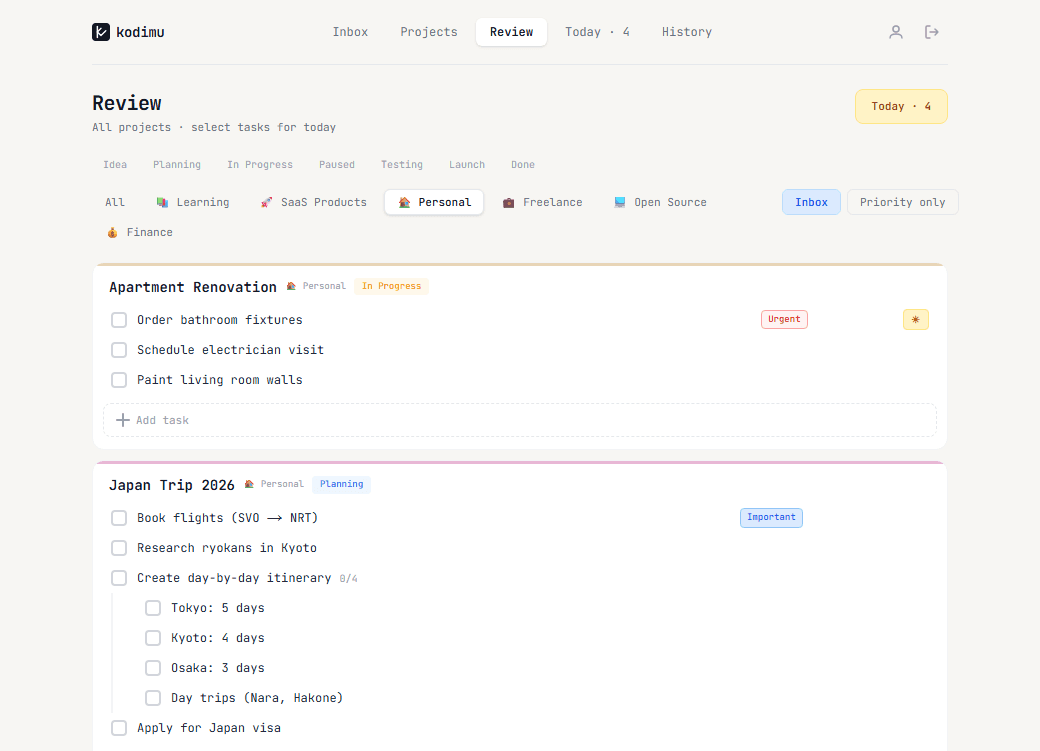
All tasks, one screen
See every task across all projects on one page. Filter by category — work, personal, whatever. Pick tasks for today and go.
Real time tracking
Not pomodoro timers. Real tracking. Hit focus on a task and it counts. See that a bug took 10 min but a feature took 3 hours.
End-to-end encrypted
Tasks get encrypted in your browser before hitting the server. Zero-knowledge. Server can't read anything.
Everything you need, nothing you don't
Built for people who want to get things done — not spend time configuring a tool.
Projects with stages
Organize work into projects. Each project moves through stages — from Idea to Planning, In Progress, Testing, and Done. See progress at a glance with color-coded stage badges and progress bars.
Focus sessions
Hit focus on a task and it starts counting. Pause when you need a break. Run multiple timers at once. When you're done, see exactly how much real time you spent — per task.
Review & daily planning
Every morning, open the Review page — all tasks from all projects on one screen. Filter by category, pick what matters, and it goes to Today. No noise, no switching between boards.
Subtasks and priorities
Break big tasks into smaller subtasks. Mark tasks as priority, important, or urgent. Filter by priority on the review page to focus on what needs attention first.
Ideas capture
Got an idea while working on a project? Capture it instantly without leaving context. Ideas live inside projects so they're always in the right place when you're ready to act on them.
Categories
Group projects by categories — Work, Personal, Freelance, or whatever fits your life. Filter projects by category to switch between contexts fast.
Your data stays yours
Kodimu uses end-to-end encryption to protect your tasks, projects, and notes. Your data is encrypted with a password-derived key before it leaves your device. The server only stores encrypted data — it cannot read your content. Even if the database is compromised, your information remains unreadable without your password.
Client-side encryption
Data is encrypted in your browser before being sent to the server.
Password-derived keys
Your encryption key is generated from your password. We never store it.
Zero-knowledge architecture
The server has no way to decrypt your data. Only you can.
Start in seconds
Create projects, add tasks
Add projects with categories and stages. Fill them with tasks, subtasks, and priorities.
Review and pick for today
Open the Review page — see all tasks across all projects. Filter, pick what matters, and it goes to your Today list.
Focus and track time
Hit focus on a task and the timer starts. See exactly how long everything takes. Real time, real data.
Simple. Private. Focused.
No feature bloat, no learning curve. Just a task manager that respects your time and your data.
Get StartedMade by
Roman Fink
I built Kodimu for myself — a simple task manager that doesn't get in the way. Now I'm sharing it with others. If you have feedback or ideas, reach out on X.
@romanfinkwp